
Understanding Google’s Internal Antifraud Filtering
This article is about how Google Ads filters invalid traffic — specifically in search campaigns. What Google detects, when it detects it, and where its capabilities end. Invalid clicks as a phenomenon deserve their own dedicated piece, which I cover here. Here I focus on the filtering mechanics.
Google Acknowledges the Problem
Google doesn’t hide the fact that invalid traffic exists and needs to be dealt with. The official Google Ad Traffic Quality page describes the infrastructure the company has built for this: a global team of data scientists, engineers, and researchers working alongside automated filters and machine learning.
One concrete number Google does reveal: more than 200 sophisticated filters operating in real time. That’s serious infrastructure, and for large-scale, obvious fraud it works reasonably well. But does it fully solve the problem for advertisers? I don’t think so — the filters aren’t 100% effective and some invalid traffic gets through. Let’s look at why.
Two Classes of Invalid Traffic: GIVT and SIVT
Google and the industry standard set by the MRC (Media Rating Council) divide invalid traffic into two classes. This distinction is fundamental to understanding why some fraud passes through the filters.
GIVT (General Invalid Traffic) is identified using lists of known bots, crawlers, and other standard checks. It’s relatively straightforward: known fraud sources are flagged and filtered automatically. Google states that it works with independent verification companies such as DoubleVerify and Integral Ad Science, whose traffic analysis data can be used within Google Marketing Platform for placement quality checks and invalid traffic reporting — most likely covering GIVT in particular. That said, Google doesn’t hand these companies control over its antifraud system, and doesn’t claim to automatically use their data for blocking invalid traffic across its entire ad network.
SIVT (Sophisticated Invalid Traffic) requires deeper analysis and often human intervention. This is the category where modern search fraud lives — traffic that actively mimics real users.
This distinction explains the structure of the filtering system itself: GIVT gets cut quickly and automatically, SIVT takes time and multi-layered analysis.
How the Filtering Works: Three Levels
Tracking account data at an hourly granularity — which is where fraud activity patterns become most visible — I can see that Google’s filtering doesn’t happen all at once. It’s a staged process. Google’s official documentation confirms this.
Level 1 — Pre-impression filtering
Some traffic is identified as invalid before an impression or click is even recorded. These interactions never appear in reports at all. Official documentation states explicitly: filtering is applied either before inventory is bid on, or immediately after an event occurs, depending on when the identification happens.
Level 2 — Intraday recalculation
Impressions and clicks that have already been recorded continue to be analyzed throughout the day. This is clearly visible when you compare hourly data snapshots from an account against the final numbers later in the day. The sum of what we collected hour by hour — impressions, clicks, costs — is consistently higher than what the Google Ads interface shows by end of day. That gap is the recalculation.
The signals Google analyzes at this stage are partially described in an independent ClickGuardian review: repeated clicks from the same IP or suspicious device fingerprint, click timing inconsistent with real human behavior, deviations from historical traffic patterns for the account, industry, and geography, and traffic originating from known botnets and data centers — though the latter is most likely caught at Level 1.
Level 3 — Retroactive corrections
Google’s official help documentation states that automated invalid traffic checks cover the last 60 days. Meaning corrections aren’t limited to the current day — they can happen retroactively. In practice, the most noticeable recalculation occurs at the day boundary: the difference between evening and morning figures in an account can be significant.
When Automation Isn’t Enough: Manual Review
For cases where automated filters can’t definitively classify traffic as invalid, Google uses manual review. The system flags anomalies and collects data over days or weeks, after which human reviewers analyze the patterns and make a call. For particularly complex cases, this process can take several weeks.
An Important Detail: Credits, Not Refunds
Something many advertisers don’t know. Google states explicitly: there are no cash refunds for invalid traffic — only credits and account adjustments. If invalid traffic is identified before an invoice is generated, the charges are adjusted in the report. If it’s identified after an invoice has already been issued, a credit appears on the next invoice. In other words, the money you spent on invalid clicks isn’t freely available to you when you want it — it sits in a kind of temporal limbo and becomes accessible only when Google decides to release it.
Where the System Starts to Fall Short
Despite the scale of Google’s infrastructure, some fraud — sometimes painfully expensive fraud — passes through every level of filtering. The issue isn’t that Google’s antifraud protection is weak. The issue is the nature of modern SIVT. According to Spider AF, modern bots generate synthetic sessions with realistic mouse movements, scroll depth, and time-on-page — and pass through most behavioral filters without triggering them.
In 2024, DoubleVerify reported a 23% year-over-year increase in new fraud schemes and their variants, directly attributing this growth to the spread of generative AI. According to their Fraud Lab, bad actors are using AI to create thousands of convincing user agents and to simulate human behavior, making bot traffic significantly harder to distinguish from real users.
Researchers at HUMAN Security point to the massive growth of agentic traffic — AI agents that now conduct searches autonomously. This fundamentally changes the landscape and upends familiar patterns of search activity.
What’s emerging is an arms race that advertisers are caught in whether they want to be or not. Fraudsters continuously evolve their strategies, using AI for speed and precision in mimicking real users. Google develops its countermeasures in response, but isn’t quite keeping pace. All of this plays out in a dramatically shifting environment — the rise of AI agent traffic, changing search result formats — and the cost of all that friction falls on the advertiser.
Two scenarios where even solid filtering doesn’t fully protect you
The newcomer trap. Imagine a company entering the market for the first time using paid search. They’re new, their budget is limited. If the niche is competitive and the campaign runs with a daily cap — which is typical for newcomers — fraud can burn through that budget long before the day ends. Google will eventually issue a credit, but the impressions to real people are gone. When the budget runs out before noon, the campaign produces no results, and the advertiser leaves the auction frustrated and empty-handed.
The ongoing drain for established advertisers. If you’re a large advertiser with a substantial budget, you’re simply absorbing a share of invalid clicks as a cost of doing business. Many clients have told me they knew they were under constant fraud pressure — there was no calm, not for a moment — and that some portion of their budget was always being wasted. The only question was how much.
You can get a rough sense of your exposure in a few steps.
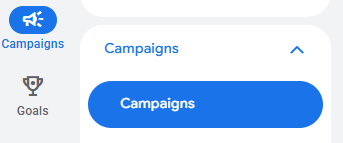
First, understand what kind of environment your niche operates in. In your Google Ads account, go to the Campaigns report.
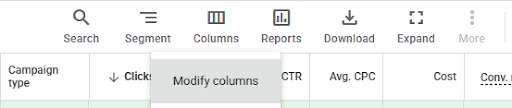
In the data table, open the Columns menu and select Modify columns.
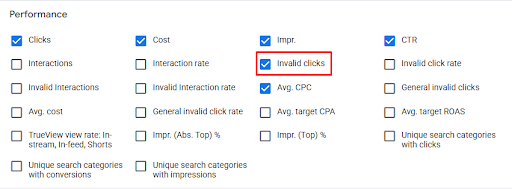
Search for “Invalid clicks” and check the box next to that metric. Click Apply.
You’ll now see in the results table the number of clicks Google classified as invalid. Compare that to the clicks Google did count and assess the scale of the problem. If your invalid click share is 20% or more, you’re operating in a highly aggressive fraud environment — your niche is in a serious storm. Expect a meaningful share of fraud in the clicks Google did count as well.
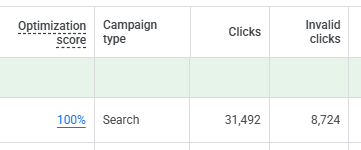
Even 10% is a moderate storm.
Some invalid patterns stay in the search term data and aren’t caught by standard filters. That’s exactly what I analyze in ClickFraudLab — three types of anomalies in Search Terms Reports that pass through Google’s standard filtering: long-tail low-frequency queries with anomalous impression volumes, single-day activity spikes, and statistical deviations measured by Z-score. The tool is deliberately simple and won’t show you the full scope of invalid clicks you’re paying for — but it will show you where some of the losses are hiding.
FAQ
How many filters does Google use to combat click fraud? According to the official Google Ad Traffic Quality page, the system uses more than 200 sophisticated filters operating in real time. Manual review is applied additionally for cases that automated systems can’t classify with confidence.
What are GIVT and SIVT in Google Ads? GIVT (General Invalid Traffic) is identified using lists of known bots and routine checks. SIVT (Sophisticated Invalid Traffic) requires deeper analysis and often human intervention. This classification is defined by the MRC industry standard and is used in Google’s official documentation.
How far back can Google recalculate invalid traffic data? According to Google Ads official documentation, automated invalid traffic checks cover the last 60 days. Retroactive corrections are possible within that window.
Does Google refund money spent on invalid clicks? No cash refunds. Google issues credits or adjusts account charges. If invalid traffic is identified before an invoice is generated, charges are reduced in the report. If identified after — a credit appears on the next invoice.
Can I monitor invalid traffic in Google Ads myself? Yes. You can add the “Invalid clicks” and “Invalid click rate” columns to your campaigns report in Google Ads. These figures show traffic the system has already caught. Analyzing fraud that passed through the filters requires a separate approach — for example, identifying characteristic anomaly patterns in your Search Terms Report.