
Understanding Invalid Traffic in Digital Advertising
In this article, I want to show one specific slice of the picture: what invalid traffic actually looks like inside the Google Ads interface, and what sits behind those numbers.
Let me define the scope upfront. I specialize in Google Ads search campaigns in service-based niches. Click fraud in display and partner networks, Google Local Services, programmatic platforms, and in-app networks operates differently and deserves its own conversation. Here I am talking only about standard search.
What Google calls what we call click fraud
Google does not use the term “click fraud” in its interfaces. The reason is straightforward: “fraud” is a legal accusation of intentional wrongdoing, and in most cases it is impossible to prove. Instead, Google introduced an umbrella term: Invalid Traffic, or IVT. According to Google’s official documentation, Invalid Traffic refers to clicks and impressions on ads that are not the result of genuine user interest, including intentionally fraudulent traffic as well as accidental and duplicate clicks.
The term works precisely because it is non-accusatory. It covers both a real bad actor draining a competitor’s budget and an accidental double-tap from a user scrolling on their phone. We will look at how to find this traffic in your own campaigns in a moment.
What Google classifies as invalid traffic
In its official documentation, Google identifies the following types:
- Accidental clicks with no commercial value, such as the second click in a double-click.
- Clicks and impressions generated by automated tools, bots, spiders, crawlers, or malicious software — the click fraud Google doesn’t name out loud.
- Clicks made by real people with the intent to inflate a competitor’s ad spend — smaller in scale but still a real problem.
- Activity that artificially suppresses an advertiser’s CTR by generating impressions without clicks, which can push the cost per click higher.
At the technical level, the industry divides invalid traffic into two tiers.
- General Invalid Traffic (GIVT) is filtered by routine methods in real time: known bots and spiders, duplicate clicks, IP addresses from data center blacklists.
- Sophisticated Invalid Traffic (SIVT) is traffic that mimics legitimate behavior, typically through botnets running on residential proxies. Because it emulates human activity, it is far harder to catch. Some of it is only identified after the fact — after the click happened and the money was already charged to your account.
Where to find the invalid clicks report in Google Ads
This report is not visible by default. You have to set it up manually.
The path: in the left menu, select Campaigns, then Campaigns again in the secondary navigation, then Campaigns at the campaign level.
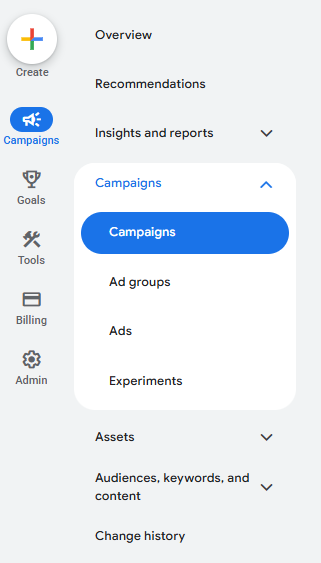
Choose the campaign you want to look at and pick a time period — any week will do. Click the Columns button, select Modify Columns.
Search for “invalid.” Google will show you several metrics.
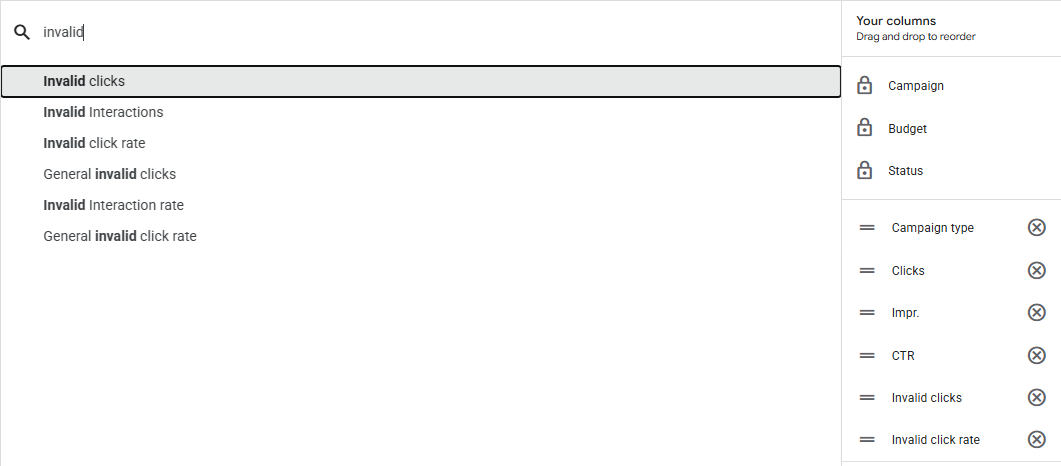
Here are the ones that matter for search campaigns.
- Invalid Clicks is the total number of clicks Google filtered as invalid during the selected period.
- Invalid Click Rate is the share of invalid clicks as a percentage of total clicks.
- General Invalid Clicks and General Invalid Click Rate cover the more obvious cases (GIVT): duplicates, known bots, data center traffic. The harder SIVT cases do not get their own column.
- Interactions and Invalid Interaction Rate are broader metrics that include non-click engagements. For standard search, the click metrics are what you need.
For a basic read on how toxic your niche is, Invalid Clicks and Invalid Click Rate are enough.
What the actual data looks like
Here is an example from a real account.
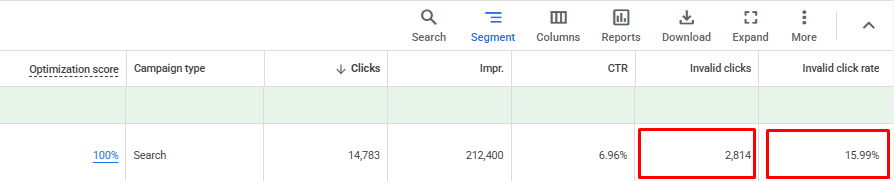
Over one week, the campaign received 14,783 clicks. Google flagged 2,814 of them as invalid — almost 16%. That is a high number. If the average cost per click in this niche is around $5, which is realistic for competitive service categories, Google’s system saved this advertiser from being charged roughly $14,000 in a single week. That is real money that did not go to traffic with no commercial value.
How to read these numbers: a rate above 10% signals a meaningful concentration of invalid traffic in the niche. Below 10%, it depends on volume — at scale, even 5% can add up to a significant dollar amount. Think of this metric as an indicator of how toxic the environment is, not as a precise measure of actual financial damage. And keep in mind that, as we established, you are not charged for the clicks Google flags.
Why this is only part of the picture
According to Google’s documentation, invalid traffic reviews cover the past 60 days of activity. That means traffic is analyzed retroactively, and some SIVT is only caught after it has already been counted. The credits come later.
That is worth sitting with for a moment. On one hand, it shows Google is genuinely putting in multilayered effort. If the platform did not care, it would not bother with systems this complex. That is reassuring — but only partially. Because those clicks were already counted, the money was already deducted, and the credit arrives sometime later, while the advertiser may be watching their daily budget disappear in real time. And even after Google runs its filtering, we still regularly find evidence of suspicious activity that passed Google’s checks and was counted as legitimate.
According to the Juniper Research report commissioned by Fraud Blocker (2023), fraud mitigation platforms recover around $23 billion of advertiser spend lost to fraud annually. That same report estimates that 17% of clicks on desktop search ads in 2023 were fraudulent and provided no return on ad spend. Juniper also projects that the volume of fraudulent clicks will grow from 37 billion in 2023 to over 65 billion by 2028.
From my own analysis of Google Ads accounts: after Google’s filters have done their work, a meaningful volume of traffic with anomalous behavioral patterns remains. That does not necessarily mean an organized attack — anomalous patterns can have different causes. But they are there, and they are worth seeing.
What to do about it
The first step is to pull the report in your own account. Add the Invalid Clicks and Invalid Click Rate columns, look across several time periods, and get a baseline read on how toxic your niche is. It takes five minutes and gives important context for interpreting everything else in your campaign data.
The second step is harder: figuring out what anomalous activity survived Google’s filtering. That requires looking at the Search Terms Report at the pattern level — unusual impression frequencies for queries of certain lengths, one-day spikes that don’t fit the surrounding data, terms that are statistically out of place in high-volume traffic. That is exactly what our ClickFraud Analyzer does. It looks at what passed through Google’s filters and remained in your Search Terms Report, and surfaces the patterns that are characteristic of organized invalid traffic. The tool is free, requires no registration, and stores none of your data. Use it.
Frequently Asked Questions
What is invalid traffic in Google Ads?
Invalid traffic (IVT) is any click or impression on your ad that does not result from genuine user interest. Google’s definition covers both intentional abuse — such as bots or competitors clicking your ads to drain your budget — and unintentional activity like accidental double-clicks. Google does not use the term “click fraud” officially; IVT is the umbrella term that applies to all of it.
How do I check invalid clicks in my Google Ads account?
The invalid clicks report is not visible by default. Go to Campaigns in the left menu, select your campaign, then click the Columns button and choose Modify Columns. Search for “invalid” and add the Invalid Clicks and Invalid Click Rate columns to your report. Select any time period you want to analyze and the data will appear in the table below the chart.
Does Google refund invalid clicks?
Google does not issue refunds in the traditional sense. If invalid traffic is detected before your invoice is generated, the amount is simply not charged. If it is detected after, you receive an Invalid Activity credit that appears as a negative line item on your next invoice. Either way, you are not billed for traffic Google’s systems flag as invalid.
Can Google catch all invalid traffic in search campaigns?
No. Google’s systems filter a significant volume of invalid traffic, but they do not catch everything. Sophisticated Invalid Traffic (SIVT) — bots running on residential proxies, traffic designed to mimic human behavior — is much harder to detect and some of it passes Google’s filters entirely. Independent research estimates that a meaningful share of fraudulent clicks in search campaigns goes undetected by platform-level filtering alone.